> ## Documentation Index
> Fetch the complete documentation index at: https://docs.voiceaiwrapper.app/llms.txt
> Use this file to discover all available pages before exploring further.
# External Billing Overview
> How External Billing works and who it is for.
## What is External Billing?
External Billing is the module that lets your agency charge clients directly for their usage of Voice AI Wrapper - outside of any platform-level subscription you may have. You define your own plans, set your own prices, and collect payment however you prefer. The platform tracks minutes, enforces access rules, and keeps a full payment history; you handle the actual collection.
External Billing is separate from the internal Stripe billing that covers your agency's own platform subscription. It is entirely about what you charge **your clients**.
## How agencies use it
The overall workflow has three phases:
1. **Set up your catalog** - Create one or more billing plans and, optionally, add-on packs in External Billing configuration. Plans define the price, billing rhythm, included minutes, and whether overage or add-on packs are allowed.
2. **Assign a plan to a client** - On the client's **Billing** tab, pick a plan from your catalog and assign it. Once a plan is assigned, the client can see it in their portal and you can start a subscription on their behalf.
3. **Manage the subscription and payments** - Once a subscription is active, the platform automatically generates payment requests on each billing cycle and tracks usage. You manually mark payment requests as paid (or failed/canceled) after you collect payment through your preferred channel.
## Key concepts
| Term | What it means in the UI |
| ------------------- | --------------------------------------------------------------------------------------------------------------------------- |
| **Plan** | A billing product you create: price, interval, included minutes, overage rate, and add-on pack eligibility. |
| **Subscription** | An active billing relationship between your agency and one client, based on a plan. Tracks the current period and status. |
| **Payment request** | A single invoice line for a billing cycle (type **Cycle**) or an add-on pack purchase (type **Pack**). |
| **Add-on pack** | A one-time block of minutes a client can purchase on top of their plan's included minutes. |
| **Wallet** | The accumulated add-on minutes balance for a client. Wallet minutes never expire and do not reset at period end. |
| **Billing period** | The date range for the current subscription cycle. Included minutes reset when each period ends. |
| **Client portal** | The Billing page your clients see when they log in: current plan, usage, available add-on packs, and their payment history. |
## How the pieces connect
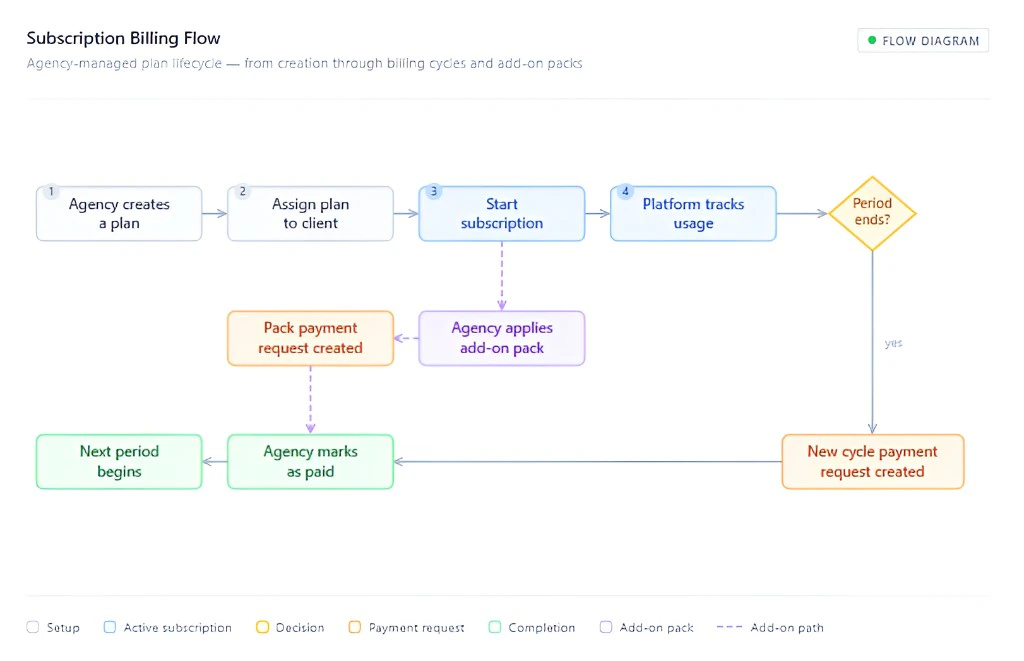 ## What the client sees
Clients log in to their portal and see:
* Their **Current Plan** name, pricing, and billing period.
* **Usage This Period** - how many included minutes they have used, any add-on balance, and any billable excess.
* **Available Add-On Packs** - packs you have assigned to them, with a note to contact you to purchase.
* **Payment requests** - a full table of all charges, their status, and due dates.
If a payment is overdue or the subscription is blocked, prominent banners appear and all running campaigns are paused automatically.
## What the client sees
Clients log in to their portal and see:
* Their **Current Plan** name, pricing, and billing period.
* **Usage This Period** - how many included minutes they have used, any add-on balance, and any billable excess.
* **Available Add-On Packs** - packs you have assigned to them, with a note to contact you to purchase.
* **Payment requests** - a full table of all charges, their status, and due dates.
If a payment is overdue or the subscription is blocked, prominent banners appear and all running campaigns are paused automatically.