

What is a payment request?
A payment request is the system’s record of a billing charge. Every charge - whether for a recurring subscription fee, end-of-period usage, or an add-on pack - appears as a payment request in the Payment requests table. The table shows a chronological history, newest first. The agency sees the table with an Update status action on every row. Clients see the same table (read-only) with an info tooltip on each status.Two types: Cycle and Pack
The Type badge on each row tells you what generated the request.Cycle
A Cycle request is always linked to a subscription. It covers a billing period and is generated automatically by the platform. Cycle requests have a secondary Kind badge:
Cycle requests have both a due date and a grace period end date. The “Grace until ” note appears in the Due & paid column for cycle rows only.
Pack
A Pack request is created when you apply an add-on pack to a client. It is linked to the add-on pack, not the billing period. Pack requests have a due date but no grace period - the tooltip on the client side states:“Grace periods apply to subscription cycle charges, not add-on pack purchases.”
Cycle vs Pack at a glance
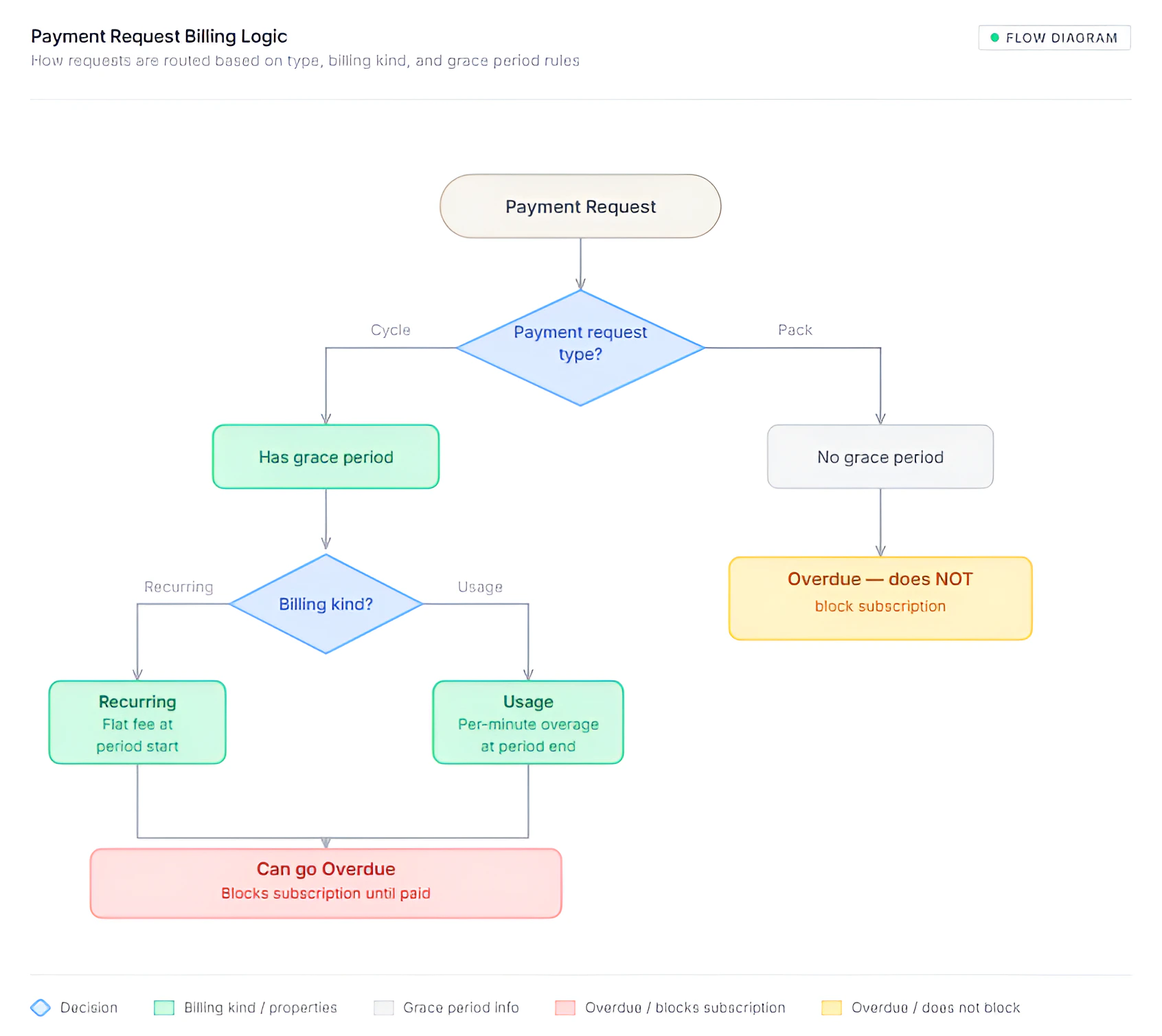
Payment request statuses
What the status tooltips tell clients
Pending
Pending
“This invoice is open. Please arrange payment with your provider before the due date. For subscription charges, a grace period may apply after the due date until payment is received.”
Overdue
Overdue
“Payment was not received by the due date. Your provider may restrict access or pause usage until the balance is cleared.”
Failed
Failed
“This payment could not be completed. Contact your provider for next steps.”
Paid
Paid
“This request has been marked paid by your provider.”
Canceled
Canceled
“This request was canceled and no longer requires payment.”
Due dates and grace periods
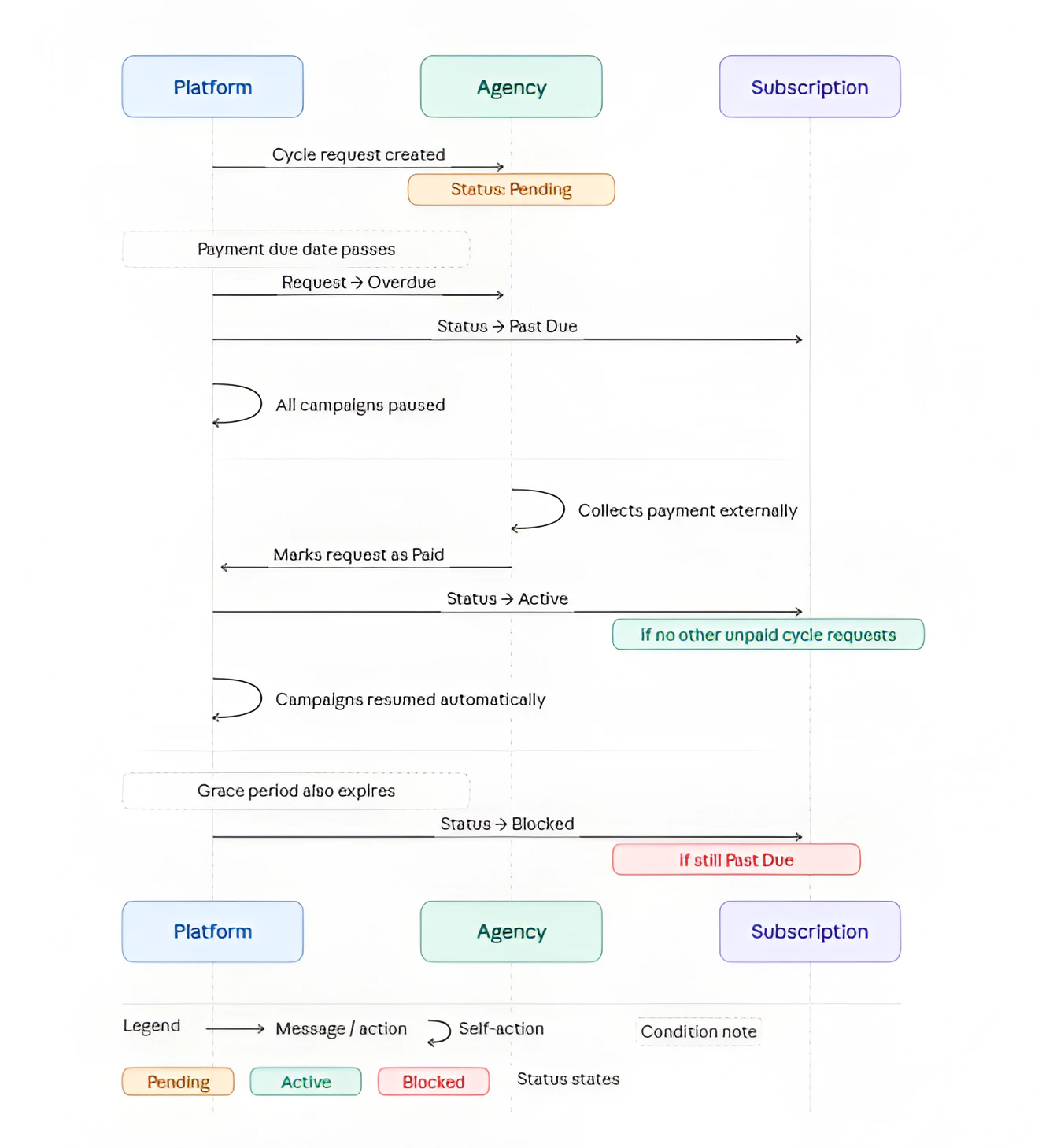
Every payment request has a Due date. For Cycle requests, a Grace until date is also shown. These are calculated from the subscription’s snapshotted settings at start time:- Payment due after period start - N days after the billing period opens, the Cycle recurring request becomes overdue if not paid.
- Grace after payment due - N additional days after the due date before the subscription moves from Past Due to Blocked.
Status transition: Overdue and recovery
Updating a payment request status
Agencies update statuses manually from the Payment requests table.1
Find the request
Open the client’s Payment Requests tab. Requests are shown newest-first with type, kind, product/pack name, amount, line-item breakdown, due date, and current status.
2
Click 'Update status'
In the Actions column, click Update status.
3
Choose the new status
The dialog “Update payment status” shows:
“Change the status for this payment request ().”Select the new status and click Save. A confirmation toast appears on success.
What happens when a Cycle request is marked Paid
- The platform checks whether any other Cycle requests for the same subscription remain unpaid (Pending or Overdue).
- If none remain, the subscription returns to Active.
- If the subscription was Past Due, any campaigns that were paused due to billing are automatically resumed.
- The “Paid” timestamp and the name of the person who marked it are recorded and shown in the Due & paid column as “Marked by ”.
Amount breakdown
Each payment request can have multiple line items. When a row has line items, the Amount cell is clickable (underlined) and shows a hover card titled “Amount breakdown” that lists each line with its description and, where applicable, the number of minutes it covers. Example - combined Recurring + Usage cycle invoice:
Example - Pack payment request:
Canceled subscription badge
If the subscription linked to a payment request was later canceled, the row shows a “Subscription canceled” badge with a tooltip:“The subscription linked to this request was canceled or removed; this row is kept for history.”This is informational - the history is always preserved even after a subscription is canceled.