

What is External Billing?
External Billing is the module that lets your agency charge clients directly for their usage of Voice AI Wrapper - outside of any platform-level subscription you may have. You define your own plans, set your own prices, and collect payment however you prefer. The platform tracks minutes, enforces access rules, and keeps a full payment history; you handle the actual collection.External Billing is separate from the internal Stripe billing that covers your agency’s own platform subscription. It is entirely about what you charge your clients.
How agencies use it
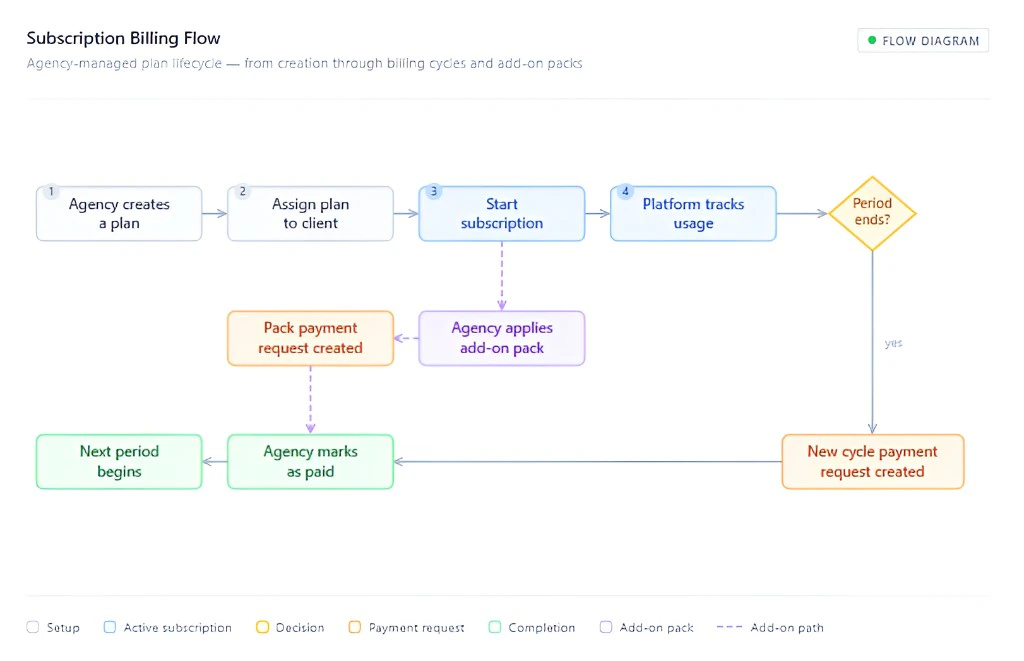
The overall workflow has three phases:- Set up your catalog - Create one or more billing plans and, optionally, add-on packs in External Billing configuration. Plans define the price, billing rhythm, included minutes, and whether overage or add-on packs are allowed.
- Assign a plan to a client - On the client’s Billing tab, pick a plan from your catalog and assign it. Once a plan is assigned, the client can see it in their portal and you can start a subscription on their behalf.
- Manage the subscription and payments - Once a subscription is active, the platform automatically generates payment requests on each billing cycle and tracks usage. You manually mark payment requests as paid (or failed/canceled) after you collect payment through your preferred channel.
Key concepts
How the pieces connect
What the client sees
Clients log in to their portal and see:- Their Current Plan name, pricing, and billing period.
- Usage This Period - how many included minutes they have used, any add-on balance, and any billable excess.
- Available Add-On Packs - packs you have assigned to them, with a note to contact you to purchase.
- Payment requests - a full table of all charges, their status, and due dates.