

Subscription statuses
A subscription is always in one of four states. The current status is shown as a badge on both the agency’s Current subscription card and the client’s Current Plan card.Lifecycle diagram
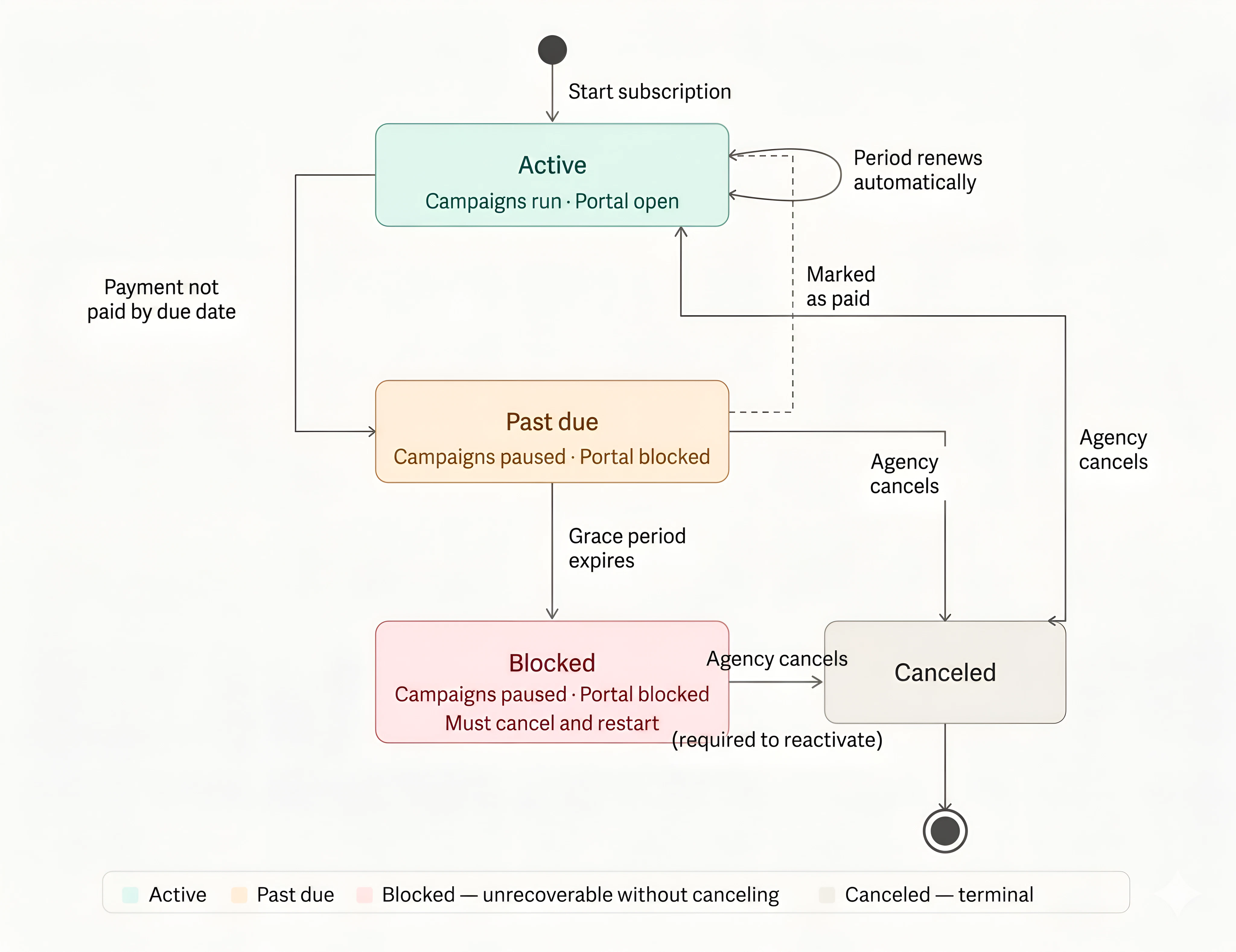
Active
The subscription is running normally.- The billing period runs between Period start and Period end (shown under Billing period on both the agency and client cards).
- Included minutes reset at the end of each period. Unused minutes do not carry over.
- The renewal badge shows one of:
- “Resets in days” - if fewer than 7 days remain.
- “Period ends soon” - if the period end is today or in the past.
- “Will renew on ” - for everything else.
- At period end the platform automatically opens the next billing period and creates a new Cycle payment request (if the plan has a recurring fee or usage billed in arrears).
Past Due
What triggers it: The platform runs an hourly sweep. When a Cycle payment request passes its Payment due after period start deadline without being marked paid, the request moves from Pending to Overdue and the subscription moves from Active to Past Due. What happens:- The client portal shows the banner: “Payment overdue - access restricted” with the message “There is an outstanding payment on your account. Your access and campaigns are paused. Please contact your provider to resolve this.”
- All of the client’s active campaigns are paused automatically.
- The agency’s subscription card shows a red banner: “Payment overdue - access blocked” with the note “Mark the outstanding payment request as paid to restore access and resume campaigns automatically.”
Blocked
What triggers it: The platform’s hourly sweep runs again after the Grace after payment due window passes. If the subscription is still Past Due, it moves to Blocked. What happens:- The agency’s card shows the red banner: “Subscription blocked - grace period expired” with the note “The grace period has expired. Cancel this subscription and start a new one to reactivate the client. Outstanding payment request history is preserved.”
- The client sees: “Subscription suspended” - “Your subscription has been suspended due to an unpaid balance. Please contact your provider to restore access.”
- Campaigns remain paused.
- Click Cancel subscription on the subscription card.
- In the confirmation dialog you will see: “This subscription is blocked due to an expired grace period. Canceling will delete the subscription and usage tracking so you can start a fresh one for the client. Outstanding payment request history will be preserved.”
- Confirm, then start a new subscription for the client.
Canceled
Canceling ends the subscription and deletes usage tracking (included minutes counter, add-on balance). All historical payment requests are kept for your records. When the subscription is not blocked, the cancel confirmation reads:“This will immediately cancel the subscription and delete usage tracking.”When the subscription is blocked, the confirmation adds context about fresh start behavior. The Cancel subscription button appears whenever the subscription is Active, Past Due, or Blocked.
Automatic period renewal
At the end of each billing period, the platform automatically:- Starts a new period with the same terms.
- Resets included minutes.
- Creates a new Cycle - Recurring payment request for the flat fee (if the plan has one).
- If there was per-minute usage above the included allowance in the previous period, also creates a Cycle - Usage payment request for the overage amount.