Minute pools and consumption order
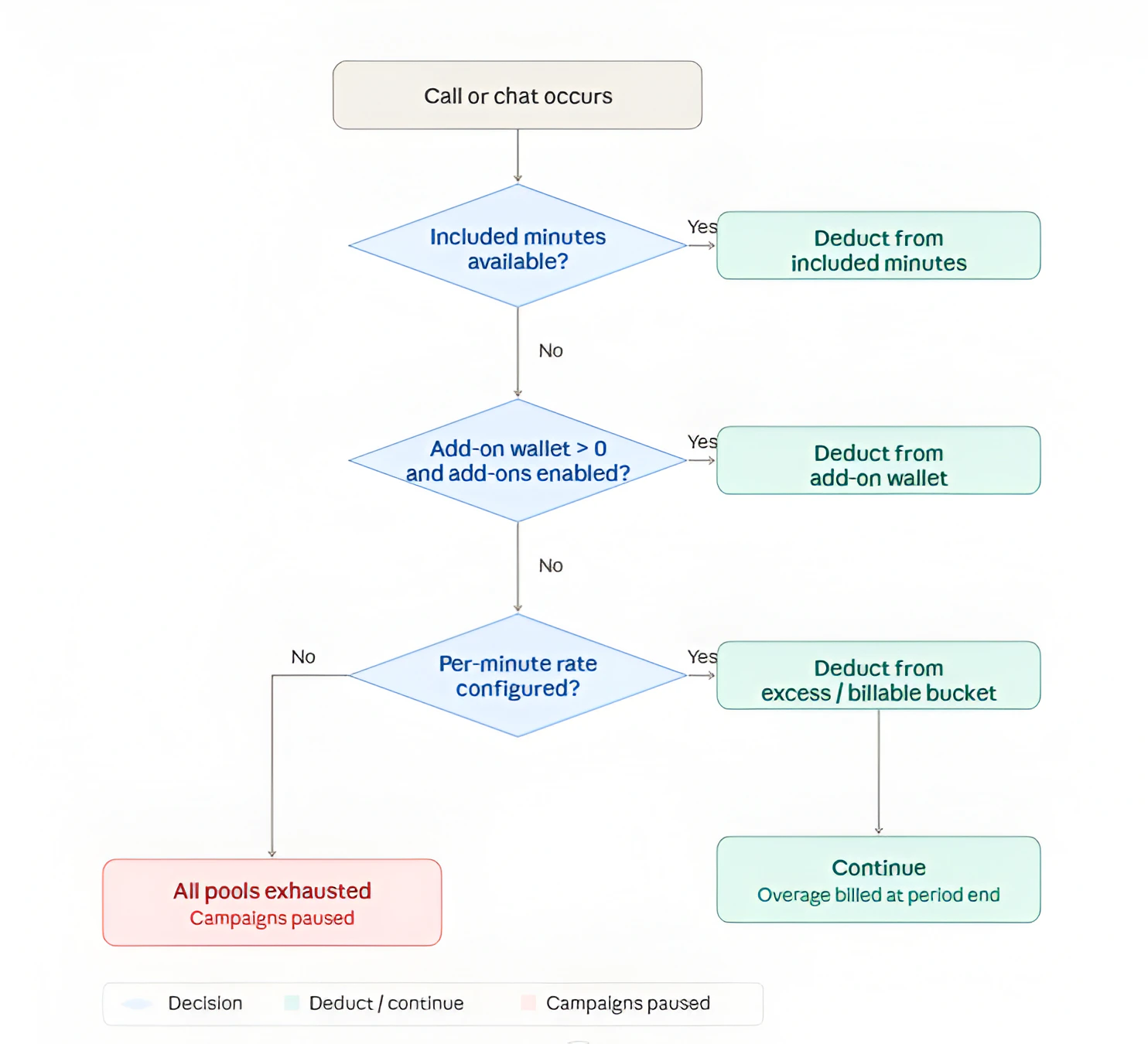
When a call is made or a chat interaction occurs, the platform deducts from the client’s minute pools in a fixed order:
The three pools are:
Included minutes
Minutes allocated fresh at the start of each billing period. Shown in the Included minutes section of the subscription card:
- “Available: / min”
- A progress bar that turns amber when 90% is used.
- “Resets each billing period” tooltip note - “These minutes are allocated each period and reset on . Unused minutes do not carry over.”
- If the plan has no recurring fee, this section is hidden (usage-only plans have no included pool).
Add-on balance (wallet)
Minutes purchased through add-on packs. Shown as “Add-on minutes (wallet)” with the badge “Never expires”.
- Drawn down only after included minutes are exhausted.
- Only available if the subscription plan has Add-on packs · On.
- Accumulated across multiple pack applications; balance persists across period renewals.
- Clients see this as “Add-on balance” on their Usage This Period card.
Excess minutes (billable)
Minutes used beyond both the included allowance and the add-on wallet, when the plan has a per-minute rate configured.
- Shown as “Excess minutes (billable)” on the subscription card.
- The tooltip reads: “Usage beyond included + add-on. Billed at per minute at period end.”
- At period end, the platform creates a Cycle - Usage payment request for the total billable minutes × the per-minute rate.
- Clients see this as “Billable usage” on their usage card.
When there is no overage option
If all three pools are exhausted and the plan has neither a per-minute rate nor any add-on balance, the platform treats this as an access restriction:
- All of the client’s campaigns are paused automatically.
- The pause reason stored internally is: “Included Minutes are exhausted; campaigns were paused to avoid further usage.”
Chat conversion
When Chat Enabled is shown on a plan, chat interactions count against the minute pools using the conversion rate displayed as “1 min = chats”. For example, if the conversion is 5 chats per minute, consuming 50 chats deducts 10 minutes from the active pool.
The client’s usage card shows equivalent chat counts wherever minute amounts appear:
- ”≈ / chats” below the included minutes progress bar.
- Included minutes and overage rate descriptions include a blue annotation like ”(≈ chats)” or “(or chats)”.
Access gates and the client portal
The platform checks several conditions before allowing a client user to access their portal or run campaigns:
Past Due and Blocked statuses immediately restrict the client’s portal access regardless of remaining minute balances. Marking the outstanding payment request as Paid is the only way to restore access from a Past Due state.
Billing status summary badges
On the agency’s subscription card, two badges reflect the current billing state at a glance:
- ” unpaid” (red destructive badge) - appears when there are outstanding payment request amounts across any currency.
- “Next due: ” (outline badge) - shows the earliest upcoming due date across all open payment requests.
Campaign pause and resume behavior
When campaigns are paused by the billing system, the pause reason is one of:
- Minutes exhausted - included and add-on balance both ran out, no per-minute rate.
- Subscription payment overdue - the subscription moved to Past Due.
- Grace period expired - the subscription moved to Blocked.
Campaigns are resumed automatically when:
- The subscription returns to Active (all cycle requests marked paid), and
- At least one minute pool is still available (included minutes remain, wallet has balance, or a per-minute rate is configured).
If campaigns were paused because minutes were exhausted, they do not resume until minutes are replenished (via a new period that resets included minutes, or an add-on pack being applied).